
Search Results:
Search Results:
Search Results:
Search Results:
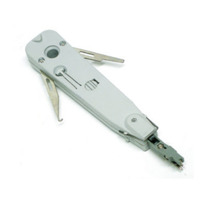
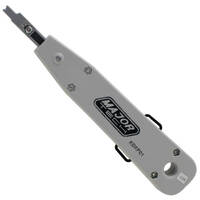
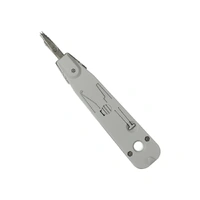
A punch down tool seats a single conductor into an IDC slot under controlled pressure. The blade pushes the insulated conductor between two sharp metal contacts inside the slot. Those contacts slice through the insulation and grip the copper to form a gas-tight connection. There is no need to strip each individual conductor first, which is what makes IDC termination so efficient compared with screw or solder methods.
Punch down tools are used across data and phone accessories, ethernet cabling, telephone systems, alarm panels, intercoms, AV distribution and structured cabling. Anywhere conductors land in IDC slots, the right punch down tool produces a clean, repeatable termination. Note that registered or fixed telecommunications cabling work in Australia must be carried out by a registered cabler or under appropriate supervision.
The blade slides the conductor into the slot, the spring releases at a set pressure, and the conductor seats fully. Many blades also trim the surplus conductor on the same stroke. One side of the blade cuts, the other side does not. Reversing the blade leaves either an uncut tail or, worse, a severed conductor in the wrong place.
Consistent seating depth is what separates a marginal termination from a reliable one. An impact tool delivers the same force at every port. A non-impact tool relies on the user's hand pressure, which varies port to port and tradesperson to tradesperson.
Each tool has a distinct job. A punch down tool terminates conductors into fixed IDC outlets and panels. A crimping tool terminates modular plugs such as RJ45 connectors onto the cable end. A wire stripper removes the outer cable sheath without nicking the conductors inside. A network cable tester then verifies the finished link for continuity, wiremap and basic performance.
A complete data cabling kit usually carries all four. Each tool addresses a different stage of the same job: strip the cable, terminate the fixed end, terminate the modular plug, then test the finished link.
For the great majority of Cat6, Cat6A and patch panel installations, yes. Most modern data outlets use 110-style IDC termination, and that style needs a matching punch down blade to seat the conductor properly. Forcing wires into IDC slots without the right tool typically results in poor contact, intermittent faults and failed certification tests.
Cat6 and Cat6A links are sensitive to pair untwist and seating depth. Even a few extra millimetres of untwisted pair near the IDC can lift insertion loss and return loss enough to fail a Class E or Class EA test. The punch down tool keeps that termination tight, repeatable and within the manufacturer's specification.
Patch panels are the most common punch down application on commercial fit-outs. A 24-port or 48-port panel may carry hundreds of individual IDC terminations on a single job. Consistent impact depth is what holds those panels together over years of repatching. Impact tools are the standard here because human hand pressure cannot match the same force across hundreds of ports without fatigue.
Many RJ45 keystone jacks use 110-style IDC slots, although some Clipsal and Krone-style jacks need a Krone blade instead. Always check the jack manufacturer's instructions and the printed colour code on the body. A wrong blade choice can damage the IDC contacts or leave the conductor sitting proud of the slot.
Preserve pair twist as close as practical to the IDC. Avoid nicking conductors during sheath removal. Seat each wire fully before trimming. Poor terminations often pass a basic wiremap test but fail under load, which is why a proper certification test matters on commercial work. Where the cabling is fixed, concealed or connected to a telecommunications network, the work must be done by a registered cabler.
Compliance note: Customer cabling work connected to a telecommunications network in Australia is regulated under the cabling provider rules administered by the Australian Communications and Media Authority. Fixed and concealed cabling must be performed by an ACMA-registered cabler or under appropriate supervision.
The two main styles answer different questions. An impact tool is the professional standard for repeatable terminations across many ports. A non-impact tool suits occasional, low-volume work where consistency across hundreds of terminations is not the priority.
An impact tool uses a spring-loaded mechanism. The user presses the tool down on the IDC until the spring releases at a preset force. The blade then drives the conductor home with the same energy every time. Termination depth is consistent across the first port and the five-hundredth port. Most impact tools include an adjustable impact setting, usually low and high, to suit different IDC styles.
Impact tools suit electricians, registered cablers, IT technicians, security installers and commercial data contractors. Where the job involves a patch panel, a structured cabling run or any volume of terminations, an impact tool pays for itself in time saved and rework avoided.
A non-impact tool relies on the user's hand pressure to seat the conductor. There is no spring release. They are smaller, lighter and cheaper. They suit a handful of terminations on a home network, a single keystone replacement or basic maintenance where the work is not regulated. The trade-off is consistency: hand pressure varies, and fatigue sets in quickly across multiple terminations.
The impact setting controls how much force the spring delivers when it releases. A lower setting suits lighter blocks and delicate terminations such as some legacy voice blocks. A higher setting suits robust data jacks and patch panels where the IDC contacts are designed for a firmer seat. Always follow the connector or block manufacturer's recommended setting where one is specified.
| Feature | Impact Tool | Non-Impact Tool |
|---|---|---|
| Termination consistency | High, spring-controlled | Variable, user-controlled |
| Adjustable force | Yes, low and high settings | No, fixed pressure |
| Best for | Patch panels, daily trade work | Occasional home jobs |
| Fatigue across many ports | Low | High |
| Typical price tier | Mid to premium | Entry level |
Blade choice is the central buyer decision after impact or non-impact. The blade must match the IDC slot on the connector or block. The geometry of the slot, the spacing of the contacts and the angle of the cutting edge differ between formats. A 110 blade will not seat properly in a Krone slot, and vice versa.
The 110 format is the workhorse of modern data cabling. It is the default blade for Cat5e, Cat6 and Cat6A patch panels and the great majority of RJ45 keystone jacks sold in Australia. 110 blades come in cut and non-cut variants. The cut version trims the conductor flush with the IDC; the non-cut version leaves the conductor long, which suits cross-connect work where the tail will be re-terminated elsewhere.
Krone blades suit LSA-Plus style IDC contacts, which use a different slot geometry to 110. Krone is common in European-specification telecommunications hardware and in selected Australian installations, particularly older telco infrastructure and some Clipsal modules. The blade geometry is not interchangeable with 110. Using the wrong blade on a Krone slot can damage the contacts and leave a failed termination.
The 66 block is a legacy voice format, still found on older telephone systems and some PABX installations. BIX is a specialist structured cabling format originally developed by Nortel, less common in current new-build work but still encountered in service and maintenance. Many trade-grade impact tools accept replacement blades in all four formats, which is useful for technicians who service mixed-vintage sites.
Yes, almost always. Before you order a tool, check what you are terminating onto. Confirm whether the patch panel, keystone jack or telecom block uses 110, Krone, 66 or BIX. For contractors who work across different environments, an impact tool with interchangeable blades and access to TV and data tools as accessories is the most flexible choice.
The right tool depends on your application, the volume of terminations you do in a typical week, the blade format you need, and how much you value features like adjustable impact and replaceable blades. Below are practical buying frameworks for the main user groups.
A heavy-duty impact tool with adjustable settings is the right pick. Prioritise a comfortable grip, a reliable spring action, positive blade locking and availability of replacement blades from the same brand. Daily site use, commercial fit-outs and multi-port patch panels reward a tool that holds up to several thousand terminations.
Versatility matters more than raw volume. Look for a multi-blade kit that covers patch panels, wall plates, security panels, intercoms and AV distribution. A combo tool with both 110 and Krone blades, or a kit with quick-change blades, suits technicians who face mixed terminations across the same job.
Affordable punch down tools, including some non-impact options, suit small quantities of terminations. A low-cost tool can deliver acceptable results on a handful of keystone jacks for a home network. Where the cabling is fixed in walls or connected to a telecommunications network, the work needs to follow Australian cabling rules and may require a registered cabler.
The differences show up in blade retention, impact consistency and rework risk. A cheaper tool can lose calibration over a few hundred terminations, leaving inconsistent seating depth. The blade can wear faster and tear conductors rather than cleanly trimming them. For occasional use, a cheap tool can be acceptable. For daily trade work, the cost of one callback usually exceeds the price gap between an entry-level and a trade-grade tool.
Kits often offer better value than buying each piece separately. A typical data cabling kit pairs a punch down tool with a cable stripper, scissors, spare blades and a pouch. Spare blades extend tool life. Replacing a worn blade is far cheaper than replacing the whole tool, and it keeps the impact mechanism performing as the manufacturer intended.
Trade users who terminate hundreds of conductors a week need features that occasional buyers can usually ignore. Build quality, ergonomics, blade change speed and consistent impact are the practical differences between a tool that lasts a decade on Australian job sites and one that fails inside a year.
Intermittent faults are expensive. A bad termination can pass a wiremap test, fail a certification test and then fail again under load weeks later, after the wall plate is closed and the ceiling tiles are back in place. Tool quality reduces that risk. Consistent impact depth produces consistent terminations. Consistent terminations pass certification first time, which means fewer callbacks and cleaner sign-offs.
Contractors and site supervisors often equip a crew with matching tools. Consistency across a team improves termination quality and simplifies blade stock. Pair the tool order with patch leads, network testers, sheath strippers and labelling supplies for a complete site kit.
Buying online suits trade buyers who want stock visibility, fast dispatch and competitive trade pricing without the back-and-forth of a counter call. A few practical checks reduce returns and project delays.
Confirm whether the patch panel, keystone jack or block uses 110, Krone, 66 or BIX. Check the manufacturer's specification sheet if you are not sure. Buy the blade format that matches what is already on the site. A correct blade choice avoids a wasted day waiting for a replacement.
Clear product descriptions, accurate stock availability, relevant trade categories, compatible accessories, replacement blades and reliable delivery options across Australia all matter. A wholesaler that carries the matching data and phone accessories, ethernet wall sockets and testers as well as the punch down tools themselves saves bundling parts from multiple suppliers.
This is a high-level overview, not a step-by-step procedure. Fixed and concealed customer cabling connected to a telecommunications network in Australia must be performed by an ACMA-registered cabler or under appropriate supervision. The notes below describe general principles that help buyers understand why the right tool matters.
Confirm the connector type and the matching blade. Note the printed colour code on the IDC block or jack body. Strip the cable sheath without nicking the inner conductors. Preserve pair twist as close to the IDC as practical. Apply the correct tool force for the block or jack you are terminating.
Blade orientation matters because one side of the blade cuts the surplus conductor and the other side does not. Reversed orientation can cut the conductor on the wrong side of the IDC contact, leaving a failed termination or a short tail that disconnects under vibration. Follow the markings on the tool body and on the blade itself.
Verify every completed link with a network cable tester. A basic continuity and wiremap check confirms each conductor lands on the correct pin and the pairs are intact. A certification tester verifies Class E or Class EA performance for Cat6 and Cat6A links. Poor punch down work usually shows up as failed wiremap, split pairs or intermittent network faults under load.
A well-maintained punch down tool produces cleaner terminations for longer. The two consumable parts are the blade and the impact spring. Looking after both extends tool life and reduces the risk of inconsistent results creeping into your work.
Inspect the blade regularly for wear, chips, dull cutting edges and any deformation of the seating face. Clean copper fragments and plastic debris out of the blade area after busy sessions. Replace blades before they start crushing or tearing conductors rather than slicing cleanly. A torn conductor tail can sit proud of the IDC and create an intermittent fault that passes a wiremap test but fails under load.
Store tools dry and protected, ideally in a dedicated pouch inside a tool bag. Avoid dropping the tool, especially onto concrete, as impact damage can disturb the calibration of the spring. Periodically check that the impact action still feels consistent. For high-volume trade use, replace a worn tool before reliability suffers rather than waiting for a callback.
Some symptoms point to tool wear rather than blade wear. Loose blade retention, inconsistent impact between strokes, cracked housings and poor cutting performance that does not improve with a new blade all suggest the tool itself is at end of life. Recurring termination faults on a known-good blade are a strong signal to retire the tool.
Three patterns cover most punch down problems on site. Each has a clear set of likely causes and a practical first-line response.
Likely causes include the wrong blade for the IDC type, a low impact setting on a heavy block, a worn blade, the wrong tool angle or an incompatible connector. Check tool and connector compatibility first. Confirm the impact setting matches the block manufacturer's recommendation.
A dull cutting blade is the most common cause. Reversed blade orientation is the next most common. An unsuitable tool, such as a non-impact tool used on a heavy block, can also leave a ragged tail. Inspect the blade and replace it if the cutting edge is dull or chipped.
Likely causes include a wrong colour sequence, excessive pair untwist near the IDC, incomplete seating, a damaged conductor or a poor-quality connector. Run a wiremap test, then a certification test if the link is Cat6 or Cat6A. For regulated cabling, refer faults to a registered cabler for assessment.
Where practical, test each link before the wall plate or ceiling tile goes back in. A two-minute test now saves a one-hour callback later.
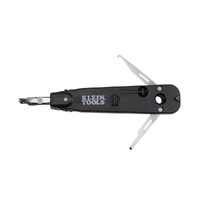
Watch Klein Tools VDV427-014 | Punchdown Tool Krone Blade video
Watch Klein Tools VDV026-212 | Data Cable Installation Kit | Yellow & Black video
Watch Klein Tools VDV526-200 | LAN Scout Jr. Cable Tester II video

All in one solution for fitting off ethernet/data cabling. Strip, Align with the layouts shown on the handle, fit plug and and crimp leaving with the perfect finish. Makes everything so quick and easy
This cable tester is incredibly straightforward and provides accurate readings in just seconds. Its compact design makes it perfect for carrying around job sites, and the clear display helps diagnose any issues without fuss. If you’re after a reliable, no-nonsense tester, the LAN Scout Jr. is a top choice.
Easy to install and has worked flawlessly in high traffic enviroments for months now without drop outs.
Trusted brands • Expert advice • Fast Australia-wide delivery • Trade pricing
Shop Punch Down Tools → Get Expert Advice →