

Great value
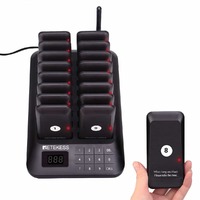
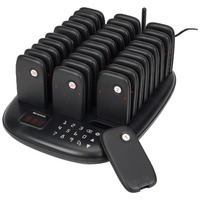
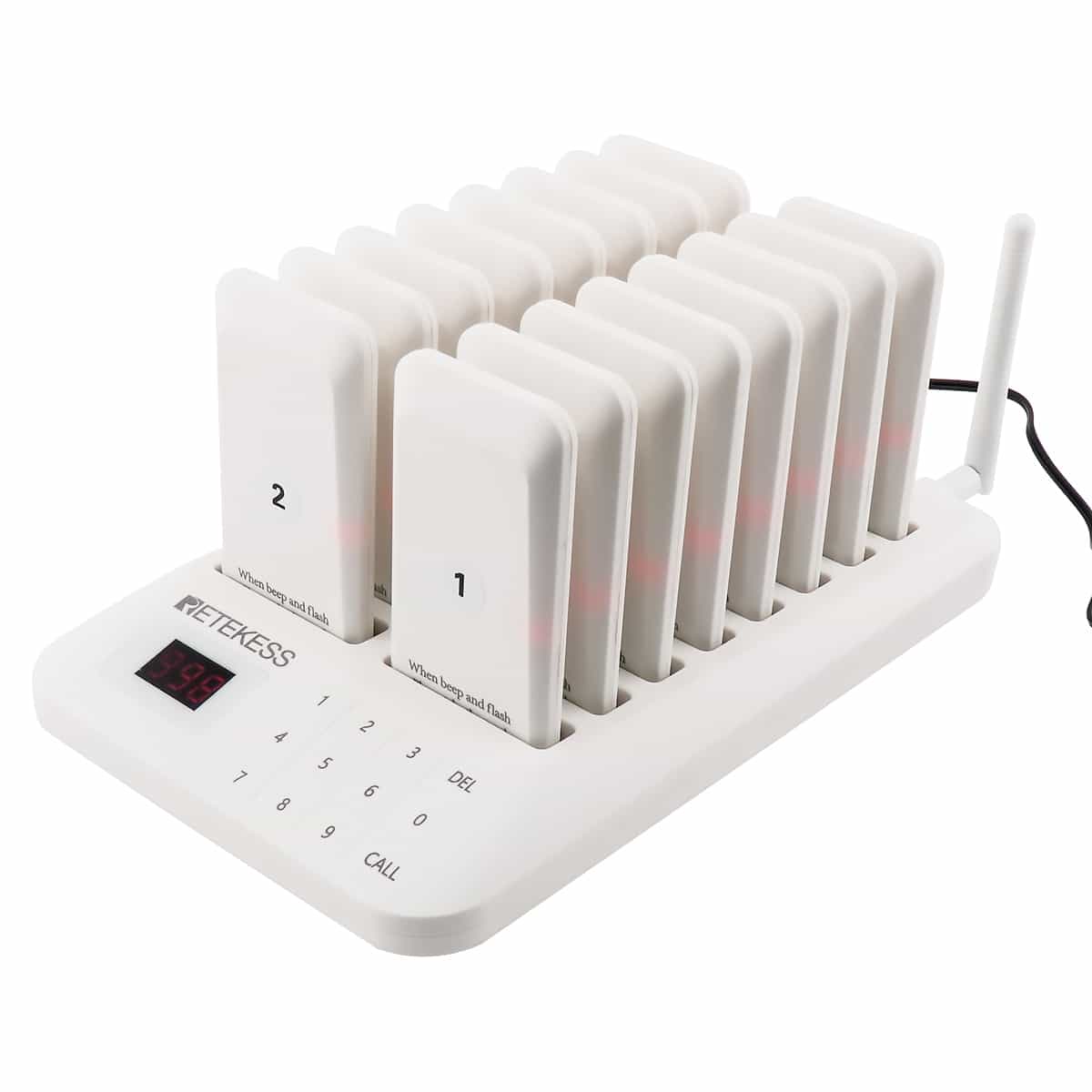
Wireless Paging System | TD157 Restaurant/Food Van Paging System | 16 Pagers | White
$198.99
$180.90 ex. GST
Search Results:
Search Results:
A wireless paging system is the simplest way for a business to send a one-way alert to a person or device without using shared infrastructure like Wi-Fi or the mobile network. The technology has been around since the 1950s and remains in active use because it does one job extremely well: deliver short messages or notifications quickly and reliably across a known area.
Every paging system has three core parts: a transmitter (the call station or keypad), the radio link, and the receiver (the pager, buzzer, or watch). Staff press a number or button on the transmitter, which sends a coded radio signal across a short-range frequency. The matching pager picks up the signal and alerts the holder through vibration, an LED flash, an audible tone, or a combination of all three.
The radio link is what makes the system work without internet, mobile coverage, or wiring between locations. Most counter-call systems used in Australian hospitality and retail venues operate in the 433 MHz band, which is licence-free for low-power devices.
Early paging in the 1980s and 1990s was tone-only, delivering a single beep with no information beyond "you have been paged." Numeric and alphanumeric paging followed, allowing short text messages to appear on the receiver's screen. Modern coaster-pager and staff-call systems use coded digital transmissions for better range, less interference, and the ability to address pagers individually from a single transmitter.
A typical guest paging or staff-call system has three hardware groups, plus a charging dock that handles all pagers between shifts.
For the cabling and outlet hardware that supports the rest of a venue's communication setup, see Data and Phone Accessories and Data Cabinets.
Wireless paging is a family of related technologies, not a single standard. The right choice depends on how far the signal needs to travel, how many users are on the system, and whether messaging needs to flow in two directions.
UHF (300 MHz to 3 GHz) and VHF (30 to 300 MHz) systems are the workhorses of in-venue paging. UHF gives shorter wavelengths, better penetration through walls, and is the band most counter-call systems sit in. VHF travels further outdoors but is more affected by interior building structure. Both are well-suited to single-site use within a few hundred metres.
DECT (Digital Enhanced Cordless Telecommunications) paging runs on the same protocol as cordless office phones. It supports two-way voice and is common in hospitals and aged-care facilities where the receiver needs to acknowledge a call. Wi-Fi paging routes alerts through the venue's existing wireless network and is popular in healthcare and large warehouses where coverage already exists.
Cloud-based systems push notifications through a hosted platform to smartphones, smartwatches, or dedicated pagers via cellular data. Wide-area paging (still used by emergency services and on-call medical staff) covers entire cities through high-power transmitters. These systems suit businesses with multiple sites or staff who travel between buildings.
Paging is one of those quiet pieces of technology that runs in the background of dozens of industries. The same basic system serves very different purposes depending on the venue.
Coaster pagers are the most visible use of wireless paging in Australia. A customer orders at the counter, takes a buzzer back to their table, and the buzzer flashes and vibrates when the meal is ready. The result is shorter queues at the counter, quieter dining areas, and fewer cold meals sitting under heat lamps. Food trucks and event caterers use the same systems with portable transmitters.
Hospitals use paging for clinician call-backs, code alerts, and patient transport requests. Aged-care facilities issue staff pagers tied to nurse-call buttons in resident rooms. The reliability of a dedicated paging frequency matters here because a missed Wi-Fi packet could mean a delayed response to a fall or medical event.
Larger retail stores use staff pagers to call assistance to fitting rooms, checkouts, or specific aisles without making in-store announcements. The customer-facing version of this is a "service" buzzer at a parts counter or dealership service desk that pages a salesperson to the bay.
Warehouses, workshops, and production lines use ruggedised pagers to summon supervisors, signal equipment faults, or alert forklift drivers to a pickup. The audible tones cut through factory noise where mobile phone notifications would be missed. For broader workplace safety hardware see Personal Protective Equipment and the Industrial Supplies range.
A paging alert reaches the right person within seconds, with no dial-up, no app to open, and no chance of being missed because someone was on a call. In hospitality, this means food leaves the kitchen at temperature and tables turn faster.
Customers stop hovering at the counter once they have a buzzer in hand. They can sit down, walk outside, or browse a nearby store. Reviews from venues using these systems repeatedly mention happier customers and quieter service areas.
A paging system has a one-off purchase cost and no ongoing service plan. By contrast, equipping a team of ten with mobile handsets and a SIM each is a recurring monthly expense. Pagers are also far cheaper to replace if dropped or lost.
Most coaster and staff-call pagers are one-way: the transmitter sends, the receiver alerts. The recipient cannot reply or confirm receipt. For workflows that need acknowledgement, choose a two-way DECT or smart-pager system.
Range claims on packaging are usually open-air figures. Concrete walls, metal shelving, refrigeration units, and microwave ovens all attenuate the signal. A 500-metre rated unit may only deliver 80 to 100 metres reliably inside a busy venue.
Pagers are small, portable, and easy to walk out the door with. Some venues lose two or three coasters a month to forgetful customers. Most systems can be expanded with replacement units, but it is worth budgeting for ongoing top-ups.
Map the floor plan and identify the furthest point a customer or staff member could be from the transmitter. Add a margin for solid walls and outdoor areas. Most cafe and restaurant systems are rated for 100 to 500 metres open-air, which translates to roughly 30 to 150 metres in a typical fit-out.
Counter-call systems are sold in fleet sizes (commonly 10, 16, 20, or 30 pagers) and the transmitter addresses each by a unique number. If a venue routinely runs more than 16 active orders at once, a 20- or 30-pager fleet avoids the wait for a coaster to come back.
Some larger venues integrate paging with their POS so the kitchen display sends a page automatically when an order is marked ready. This is more common in dark kitchens and high-volume QSR sites. A standalone paging system is simpler, cheaper, and right for most small to mid-sized businesses.
| Factor | Wireless Paging | Wired Intercom |
|---|---|---|
| Installation | Plug in transmitter, charge pagers, ready to use | Cable runs through walls, fixed mounting points |
| Mobility | Receivers move with staff or customers | Fixed handsets at known locations |
| Setup Cost | Lower upfront, no cabling labour | Higher upfront due to wiring and trades |
| Reliability | Subject to range and interference | Very stable on a closed circuit |
| Best For | Retail, food service, mobile use | Reception areas, fixed call points |
Choose wireless if staff or customers move around the venue, if the building is leased and major cabling is restricted, or if the budget does not stretch to fit-out work. Wired systems remain a sensible pick for new builds with structured cabling already in scope.
Walk the venue and note solid walls, metal cladding, large refrigeration units, and any 2.4 GHz devices that could cause interference (Wi-Fi routers, microwaves, baby monitors). Pick a transmitter location that is central, elevated, and clear of those sources.
For most cafes and small restaurants, setup takes under 15 minutes: power the transmitter, place pagers in the charging dock, run a test page to each unit, and confirm range to the furthest table. No electrician is required for the paging system itself, though the GPO that powers the transmitter and dock should comply with AS/NZS 3000:2018.
Venues over 500 square metres or with multiple floors usually need a repeater or external antenna to maintain coverage. Larger sites also benefit from zoning the transmitter so the same pager number does not cover the entire building. Confirm any antenna installation with the system's documentation.
Paging transmitters and charging docks plug into standard 240 V GPOs. The outlet itself, and any fixed wiring serving it, must comply with AS/NZS 3000:2018. If a new outlet is needed for a counter-mounted dock, that work belongs to a licensed electrician.
Sparky Direct stocks the Retekess range of guest paging systems for Australian businesses. The most popular configuration in this range is the TD157 with 16 coaster pagers, suited to cafes, food trucks, sporting clubs, and small restaurants.
A budget system from a generic seller may work for a low-traffic site but tends to fail on range, build quality, or replacement parts availability. Trade-grade systems from established brands like Retekess ship with proper documentation, spares, and a clear path for adding more pagers later.
Coaster pagers typically run 24 to 48 hours on a full charge, with the dock recharging them between shifts. Built-in lithium-ion cells last roughly 2 to 3 years before capacity drops noticeably. Replacement coasters are usually ordered as add-ons rather than swapping the cell.
Run a daily test page to a few coasters before service starts. Walk the perimeter once a quarter to confirm range has not been compromised by new equipment, racking, or fit-out changes. Note any dead zones and adjust the transmitter location if needed.
Every team member should know how to assign a coaster, look up which one is allocated to which order, and reset a unit if it fails to clear after pickup. Print a simple how-to card and keep it next to the transmitter. Treat the dock as part of the closing checklist so all coasters are charged for the next day.
Newer systems link paging into the venue's wider network so a kitchen display can trigger a coaster automatically when an order is marked ready. This removes the manual button press at the pass and is becoming standard in higher-volume QSR.
In healthcare and large facility settings, software now decides which staff pager to alert based on roster, proximity, and current workload rather than broadcasting to a group. This cuts alert fatigue and improves response times to genuine priority calls.
Smartphones have replaced pagers in many consumer use cases, but dedicated paging persists where reliability matters more than features. Hospitals, food service, and industrial sites continue to specify dedicated devices because they boot instantly, have multi-day battery life, and are not affected by app updates or carrier outages.
If pagers fail in one part of the venue, the transmitter is probably blocked by a wall, fridge, or steel structure. Move the transmitter higher, relocate it 1 to 2 metres away from the obstruction, or fit a repeater for sites over 500 square metres.
Check the charge first. If the pager is charged and the transmitter shows the page sent, the unit may have de-registered from the system. Most transmitters have a re-pair sequence in the manual that takes under a minute.
Other 433 MHz devices (garage door openers, weather stations, some car key fobs) can occasionally interfere. If alerts are inconsistent at certain times of day, check what else nearby is operating in the same band and consider relocating the transmitter or those devices.
When to call an electrician: The paging system itself is plug-and-play, but the supporting hardware around it (240 V GPOs, dedicated outlets at the counter, any new fixed wiring) is electrical work. That sits with a licensed electrician under AS/NZS 3000:2018.
Watch Wireless Paging System | TD157 Restaurant/Food Van Paging System | 16 Pagers | Black video
Watch PSA INTWAST1 | Wi-Fi GSM Alarm System 3G/4G 105dB video
Watch MATCHMASTER 50MM-WD01 | Smart Wi-Fi Video Doorbell video

Bought one for my Football Club (Soccer). Works a treat - the spectators are so much happier as now they can continue to watch the game and wait for their burgers instead of waiting in the line. Love these little beauties.. Thanks Sparky Direct you are Awesome
Good product, easy to use, prompt service from Sparky Direct. Only down side is it is not working when customers put it in their pockets.
Brought these fir my mobile food van, can’t fault them at all they do what they say and no more loss of voice at end of each day
Quality products in stock • Fast Australia-wide delivery • Competitive trade pricing
Browse Wireless Paging Systems → Get Expert Advice →Yes, pagers are collected after use so they can be recharged and reused.
Sparky Direct supplies wireless paging systems with fast Australian delivery to support hospitality and service environments.
Most systems are plug-and-play, though any fixed electrical connections should be installed by a licensed electrician.
Warranty coverage varies by manufacturer and typically applies to manufacturing defects.
Consider venue size, required range, number of pagers, and alert type preferences.
Yes, systems are commonly sold as kits including a transmitter and multiple pagers.
Yes, they can improve convenience and waiting comfort, which may enhance overall customer satisfaction.
Basic maintenance includes charging pagers and keeping equipment clean and functional.
Guest pagers are generally designed to withstand regular handling in busy environments.
Some systems are suitable for outdoor or semi-outdoor use, depending on signal strength and conditions.
Yes, they allow guests to move freely while waiting, helping reduce congestion around service areas.
Many pagers use vibration or light alerts to reduce noise, making them suitable for quieter venues.
Pagers are usually charged via a dedicated charging base or dock supplied with the system.
A wireless guest paging system is used to notify customers or guests when their order or service is ready without the need for wired infrastructure.
Guest pagers are generally intuitive, with clear alerts that indicate when to return or collect an order.
Most systems are designed for simple operation with minimal staff training required.
Yes, they are specifically designed for commercial and hospitality applications.
Many systems allow additional pagers to be added, depending on the model and capacity.
Yes, most systems are designed to support multiple guest pagers from a single transmitter.
Operating range varies by model and environment and should be checked against site requirements.
Guest pagers typically provide vibration, audible alerts, flashing lights, or a combination of these.
Paging systems supplied in Australia should comply with relevant electrical safety and radio communications requirements.
Most wireless paging systems operate independently of the internet, using dedicated wireless signals.
The system uses radio frequency or digital signals to send alerts from a transmitter to a guest pager.
They are commonly used in cafés, restaurants, food courts, healthcare settings, and service counters where customers wait for service.